If you run a small business, creating blog posts, emails, social media content, and other marketing materials can take a surprising amount of time.
AI writing tools can help with this, but not every tool works in the same way. Some are designed mainly for long-form content, while others focus on short-form copy and everyday writing tasks.
In this Rytr review, I tested Rytr myself to see how useful it could be for small business content creation.
I tested several of Rytr’s use cases, including Blog Section Writing, Email, and Blog Idea & Outline. I also looked at how much editing would be needed before using the generated content on a real business website.
What Is Rytr?
Rytr is an AI writing assistant designed to help users create different types of written content.
Instead of asking the user to start with a completely blank page, Rytr provides different use cases for tasks such as blog content, emails, social media posts, calls to action, and other types of copy.
This makes the tool particularly interesting for small businesses that need to create content regularly but do not have a dedicated content team.
Rytr also provides different tones and language options, allowing users to adjust the style of the generated content.
My Rytr Test
Rather than judging Rytr only from its feature list, I wanted to see what the tool actually produced.
For my test, I used English and an Informative tone because that is the type of content I would normally create for a small business website.
I tested three different workflows:
- Blog Section Writing
- Blog Idea & Outline
The goal was not to create a finished article automatically. Instead, I wanted to see whether Rytr could help with the parts of content creation that usually take the most time.
Test 1: Blog Section Writing
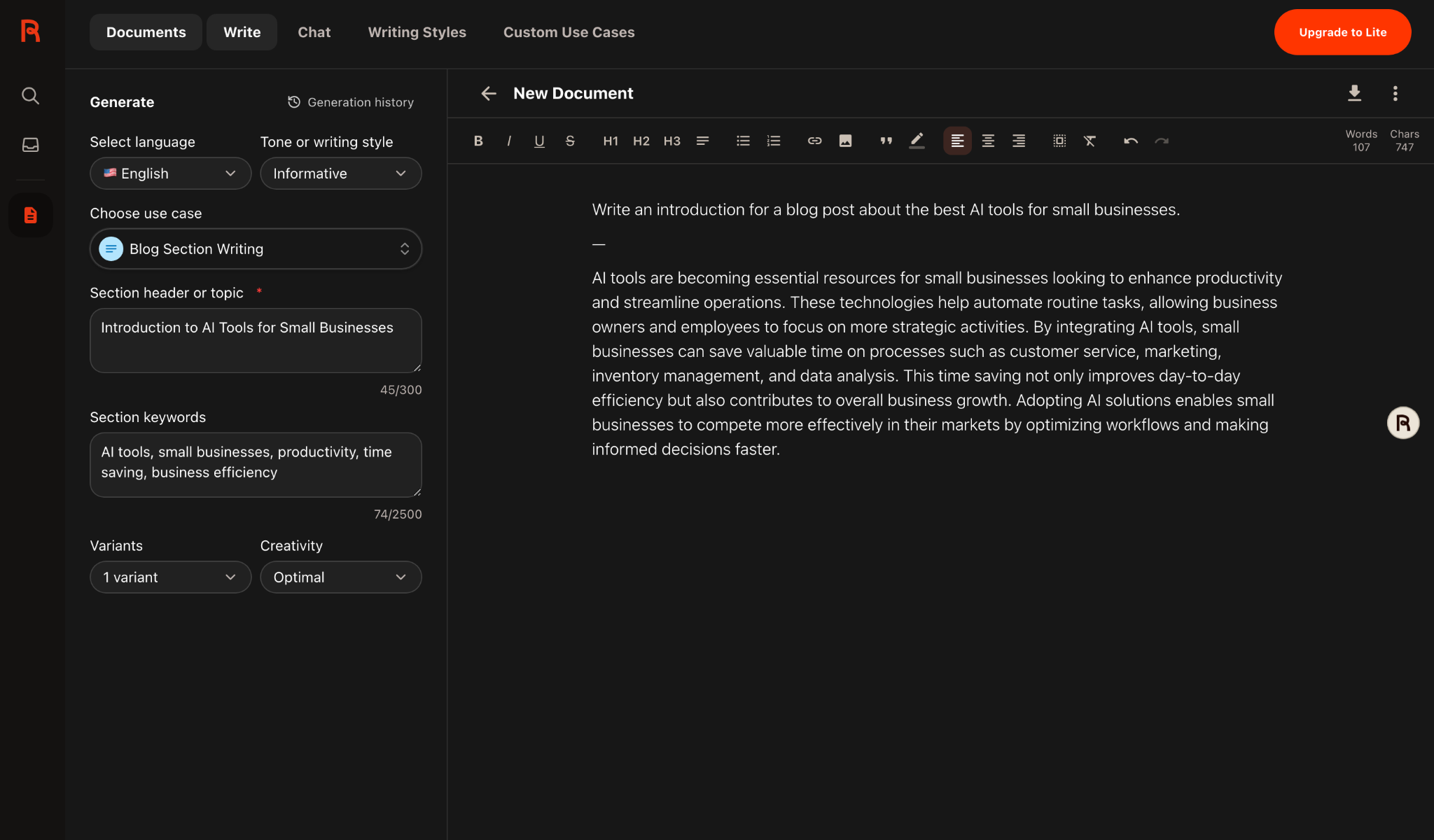
For my first test, I used Rytr’s Blog Section Writing feature to create an introduction about AI tools for small businesses.
I entered the following topic and keywords:
- Topic: Introduction to AI Tools for Small Businesses
- Keywords: AI tools, small businesses, productivity, time saving, business efficiency
- Tone: Informative
- Creativity: Optimal
Rytr generated a 107-word introduction. The result was readable and well structured, but the content was fairly general and similar to what you might expect from a basic AI-generated introduction.
Here is the result from my test:
Test 2: Email
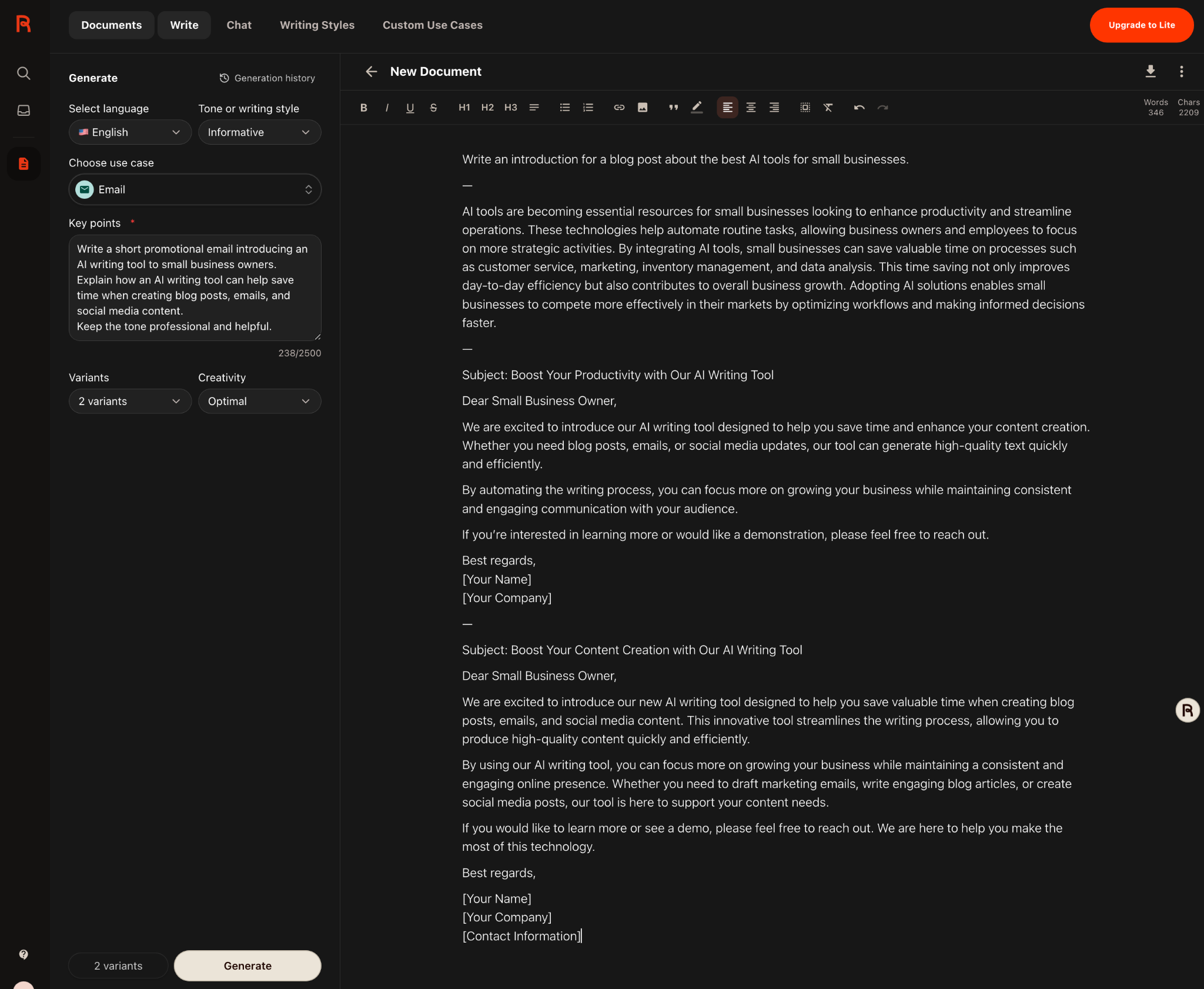
Next, I tested Rytr’s Email use case. I asked it to create a short promotional email introducing an AI writing tool to small business owners.
I asked Rytr to explain how an AI writing tool could save time when creating blog posts, emails, and social media content, while keeping the tone professional and helpful.
Rytr generated two email variations. Both included a subject line, greeting, main message, call to action, and sign-off.
The structure was useful, especially for someone who needs a quick starting point. However, the wording was quite generic, so I would still customize the message before sending it to customers.
Here is the result from my test:
Test 3: Blog Idea & Outline
For the third test, I used Rytr’s Blog Idea & Outline feature with the primary keyword Rytr Review for Small Businesses.
Rytr generated an outline covering topics such as Rytr’s features, how it can help small businesses save time, ease of use, comparisons with other AI writing tools, and tips for using Rytr effectively.
The outline was useful as a starting point because it quickly provided a possible structure for a review article. However, some of the suggested wording was quite promotional, so I would review and rewrite the headings before using them in an actual article.
Here is the outline generated by Rytr:
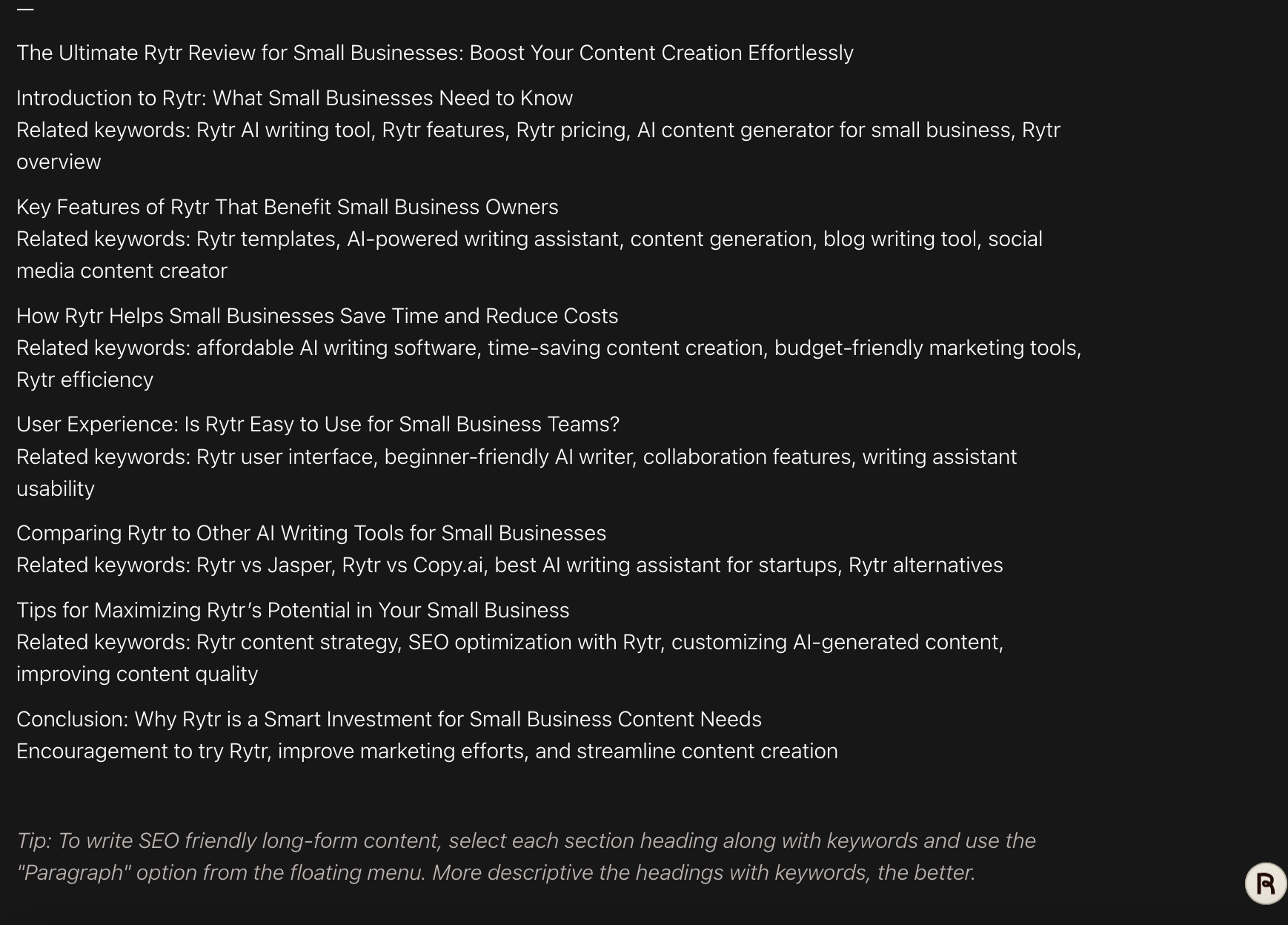
It also suggested related keywords for each section.
This is useful when you know the subject of an article but are not sure how to organize it.
However, I noticed something important.
The generated outline sometimes moved toward conclusions before the actual testing had been completed. For example, it suggested a conclusion presenting Rytr as a smart investment.
For a review, I think it is better to test the product first and decide what conclusions are supported by the experience.
What I Liked About Rytr
1. It is easy to get started
The basic workflow is straightforward. Select a language, choose a tone, select a use case, provide some information, and generate the content.
You do not need to build a complicated prompt every time.
2. There are different use cases
One of the most useful aspects of Rytr is the range of content types available.
During my test, I used Blog Section Writing, Email, and Blog Idea & Outline. These workflows were noticeably different from each other.
This makes Rytr more practical for businesses that need several types of content rather than only blog articles.
3. It is useful for getting past a blank page
For me, one of the clearest benefits was simply getting something on the page quickly.
Even when the generated content was too generic to publish as-is, it provided a starting point that could be edited and improved.
What I Didn’t Like About Rytr
1. The output can be generic
This was the biggest issue I noticed during my testing.
The generated content was readable, but some of the claims and descriptions were very broad.
For example, statements about saving time, improving productivity, and creating content could apply to many competing AI writing tools.
If you want a detailed product review, you still need to add your own experience, examples, screenshots, and opinions.
2. It still requires editing
Rytr can produce a draft quickly, but I would not treat the generated text as a finished article.
Editing is necessary to make the content more specific, accurate, useful, and consistent with your site’s writing style.
3. AI-generated content does not replace firsthand experience
This became particularly obvious while creating this review.
Rytr can explain what an AI writing tool is supposed to do, but it cannot provide my personal experience with the tool.
That is why I think a useful AI tool review should combine AI-generated assistance with real testing.
Is Rytr Good for Small Businesses?
Based on my testing, Rytr can be useful for small businesses that regularly need to create written content.
It can help with tasks such as:
- Creating initial blog drafts
- Generating blog section ideas
- Creating email drafts
- Developing social media content
- Getting ideas when you are stuck
- Turning a basic idea into a structured draft
However, I would not recommend using it as a completely hands-off content generator.
The best results are likely to come from using Rytr as a writing assistant rather than allowing it to replace the entire content creation process.
- Small business owners who create content themselves
- People who frequently write emails or marketing copy
- Bloggers who need help getting started
- Users who want quick drafts and content ideas
- Anyone expecting completely finished content with no editing
- Businesses that need highly specialized or deeply researched content without additional work
- Writers looking for a tool to replace firsthand research and expertise
Rytr vs. ChatGPT
Rytr and ChatGPT can both help with writing, but they approach the task differently.
Rytr provides dedicated writing workflows and use cases, which can make it convenient when you already know what type of content you want to create.
ChatGPT, on the other hand, is more flexible for broader conversations, research assistance, brainstorming, and detailed instructions.
I would not consider this a direct performance comparison based on my current test, because I did not run an identical set of prompts through both tools.
Instead, the main difference I noticed is the workflow. Rytr’s predefined use cases make it easy to start a specific writing task without building a prompt from scratch.
How I Would Use Rytr for Cormeliq
After testing the tool, I would use Rytr mainly as part of the writing process rather than as the entire writing process.
For example, I could use it to:
- Generate an initial article outline.
- Create a first draft of a specific section.
- Generate alternative wording.
- Create an email or social media draft.
- Edit and rewrite the content manually.
- Add original examples, screenshots, and firsthand observations.
- Check the final article for accuracy before publishing.
This workflow keeps the time-saving benefit of AI while still allowing the final article to contain original information and real experience.
Final Thoughts: Is Rytr Worth Trying?
After testing several Rytr use cases, I think its biggest strength is convenience.
It can quickly turn a basic topic into a draft, outline, email, or section of content. For a small business owner who regularly has to create written content, that can be useful.
At the same time, my testing showed that the generated content can be fairly general. I would therefore not recommend simply copying the output and publishing it without review.
For me, the most useful way to think about Rytr is as a writing assistant.
Use it to overcome the blank page, create a first draft, organize ideas, and speed up repetitive writing tasks. Then add your own knowledge, examples, experience, and editing.
That approach makes much more sense for a small business website than expecting AI to produce a complete article without human input.